A family tree holds information about living people: names, birthdays, places, relatives. RootsPersona lets you decide who sees what, and keeps hidden people out of every place where they could leak: page titles, menus, search engines, the front page of the tree and the export.
Who may see a person
Each person has one of these levels:
| Level | Who sees the person |
|---|---|
| Public | everyone |
| Members Only | users logged in to your site |
| Private, Admins Only | administrators of the site |
| Exclude from site | nobody: the person gets no page (only for living people) |
“Members” are simply users with an account on your site. To let relatives see living people, create accounts for them in Users → Add New (the role Subscriber is enough).
The rules for the whole tree
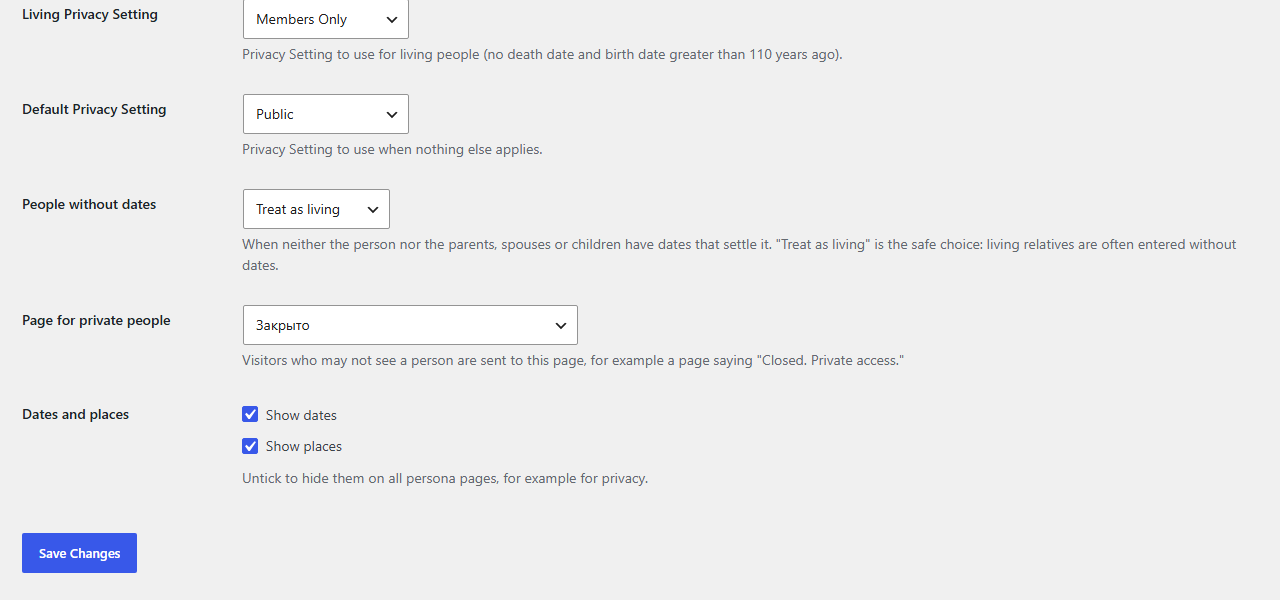
Open Settings → RootsPersona → Privacy:
- Living Privacy Setting — the level for living people. On a new site it is Members Only.
- Default Privacy Setting — the level for everyone else, when nothing else applies. On a new site it is Public.
- People without dates — see below.
- Page for private people — see below.
On the Persona page tab you can also untick Show dates or Show places to hide them on all pages.
Who counts as living
- A person with a death date is deceased.
- A person without a death date who was born less than 110 years ago is living — unless their own events say otherwise: a burial without a death date means deceased.
- A person without a birth year is judged by their own events and by their parents, spouses and children. A child born in 1850 means the parent is deceased; a spouse born in 1990 means living.
- When nothing settles it, the People without dates setting decides: Treat as living or Treat as deceased. “Treat as living” is the safe choice: living relatives are often entered without dates.
In the next version: the age limit of 110 years becomes a setting (from 80 to 150).
A different level for one person
Any person can have their own level instead of the rule. Log in as administrator, open the person’s page and press Edit Person at the bottom of it. In the privacy box choose the level, or Default to follow the rules again, and save.
If you do not want the Edit links on the pages, untick them on Settings → RootsPersona → Persona page; visitors never see them anyway.
What happens to a hidden person
For a visitor who may not see a person:
- the page title, the browser title and the title for Yoast SEO / Rank Math become Private, and the page gets a noindex tag, so search engines do not show it;
- the page is left out of the WordPress and Yoast XML sitemaps, menus and page lists;
- the person is left out of the search, the front page of the tree (numbers, faces, remembrance days, surnames, places) and the index;
- on the pages of relatives the person appears as “Private” instead of their name.
Birthdays and portraits of living people on the front page of the tree are shown to logged-in members only.
A page for private people
Instead of showing “Private”, visitors can be sent to a page you choose, for example a page saying “Closed. Private access — ask the family for an account.” Create that page and pick it in Page for private people.
Privacy in the export
When you export the tree on Tools → RootsPersona → Export GEDCOM, tick Leave out living and private people for a file you give to others. See GEDCOM: import and export.
Map and privacy policy
RootsPersona does not send your tree anywhere. The only outside service is the map on persona pages: the visitor’s browser loads the map images from OpenStreetMap, which sees the visitor’s IP address. If your site has a privacy policy, mention it there, or switch the map off (Settings → RootsPersona → Persona page → Show on the page → Map of places).
Check it yourself: after changing privacy settings, open a few pages of living people in a private browser window, where you are not logged in. That is exactly what a visitor sees.